Archive for the “RV Tech” CategoryRV technology: RV solar power, mobile satellite internet, RV systems, biodiesel
Feb
11
2010
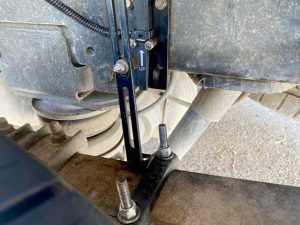
Mission Accomplished, Once AgainPosted by Jim in RV Tech, Work, tags: Datastorm, internet, MotoSat, Repairs, satellite, warrantySo the new elevation motor for our F2 satellite dish finally arrived. Many thanks to Solar Mike for letting us use his address. But of course the package did not include any of the insulated Scotch Locks I was promised it would. Big surprise, it was hard enough getting a tracking number from MotoSat. “If you’re near a Lowe’s or home Depot…” the MotoSat tech started to tell me where I could get some Scotch Locks. I cut him off with a laugh, “Yeah, right!” A couple standard insulated wire connectors I had would have to do the trick. After a day of brief flash floods, and too many days of sharing our MiFi wireless internet connection, I was able to quickly and easily replace the motor set – thus completing yet another repair on our dish. All seemed well as the dish successfully completed its calibration. Then upon search, it returned a motor stall error, azimuth this time. Big Surprise. Sending the dish up again resulted in success. A fluke? Perhaps. But something didn’t seem right. When the dish went down, it’s azimuth was way off. While the D3 controller reported 0º azimuth, the dish was clearly out of alignment. After a couple more tests we could could not reproduce the error. So we are back online with good ol’ satellite 91 West – telling ourselves again that if it ain’t broke, don’t fix it. Deep down we are hoping we don’t have another motor going bad, however, because MotoSat informed us of an interesting clause in their warranty agreement. All replacement parts are only covered under warranty from the original system purchase date. So the replacement motors – yes, motors plural – we have installed, are only covered until our original warranty is up. A date which is quickly approaching. As I said, big surprise.
Jan
30
2010
EagleSat Delivers Superior MotoSat SupportPosted by Jim in RV Tech, Spending Money, Work, tags: EagleSat, internet, MotoSat, Slab City, the slabsHere’s a long overdue shout out to the fine folks at EagleSat. This small family-owned business in Longmont, CO serviced our MotoSat satellite internet system the last time we had problems. Which was apparently not the last time.
We weren’t about to return to Salt Lake City again, and pickings were slim for mobile internet experts in Wellington, CO. Our choices were an upholstery shop that sold MotoSat systems in nearby Fort Collins, or driving a couple hours to EagleSat. We opted for the latter and were glad we did. One phone call to Frank, and we had an appointment scheduled and parts on the way. The next week we spent a day with he and his son Adam working on our rig, and we were home before dark. They cleaned up our entire system, replaced all the motors, and yes, even upgraded the D3 firmware. So here we sit now, waiting for another elevation motor set to arrive. As soon as we set up here on the slabs, the dish wouldn’t budge. After troubleshooting all I could, the first person I called was Adam. He was polite, generous with his time, and helped me determine that both our elevation motor was shot, and I could do the repair myself. All I had to do was call MotoSat for the part. Oh that, and find an address for shipping.
But there I go digressing once again. It’s just a good thing we now have our MiFi for internet service redundancy! I could think of worse places than Slab City, USA to be waiting on parts. Ones that cost money for instance. But if I run into any challenges putting our F2 mount back together, I know who I’ll be calling … EagleSat is a satellite communications company specializing in remote site connectivity and network interoperability. They offer premium mobile satellite solutions for commercial use and the recreational consumer (Motor Coaches and RV’s). EagleSat offers a full-line of mobile satellite systems for Internet access (voice and data) and/or television reception. And they know their stuff – there is a reason they service MotoSat systems, but not sell them!
Dec
06
2009
Finding the Best Position for MotoSAT Internet AccessPosted by Jim in Boondocking, Full-Timing Tips, Live, RV Tech, tags: Boondocking, internet, MotoSat, positioning, satellite, solar
So, I always make it a point to make sure ours is current before calling for support. I also turn to others for help. Like Sean who had this advice regarding the best positioning for quick access…
Well, it turns out that compass calibration isn’t even possible with our dish. One expert installer informed us that only older systems have a compass. But we recently tested Sean’s parking position theory when it took forever for our system to identify any signal. We had inadvertently parked with 91W directly to the rear of our rig. Sure enough, when we relocated and parked pointing a little more West, we were online within a couple minutes. This position works best for us anyway, especially when boondocking. Doing so prevents the dish’s large shadow from covering our solar panel throughout the day.
Nov
24
2009
Phase II of Our JourneyPosted by Jim in Full-Timing Tips, Live, Our Story, RV Tech, Work, tags: maps, road trip, RV, WordPressGoing seasonal certainly has put the trip into roadtrip. After a couple quick months in our new mountain home, it was exciting to get back on the road, but it’s kinda weird to have settled right back down here at The Desert Rose while René is doing her time at Amazon. We are nowhere warm yet, so I wouldn’t say we quite qualify for true snowbird status yet. Leaving the house behind, however, officially signifies Phase II of our journey. So, we have a new Maps page to commemorate the occasion. All our original travel maps from Phase I are still available to show where we’ve been. And now you can see with a quick glance at our new full-time RVer visited states map.
I’m just happy I didn’t have to manually design this map. While my search for a WordPress visited states map widget for RVers ended with me wondering if I’m the only out there who thinks such a plugin would be really cool, I did come across a couple websites for automatically generating colorful RVer maps of visited states ready for use on any website!
So, 36 states down, only 14 to go – though I’m not sure how we’re getting the rig to Hawaii. Aside from leaving the mainland, and navigating a few congested New England states, we can now say we have been just about everywhere, except the middle. Well, that’s what this whole phase II thing is all about, or perhaps Phases III and IV. Now that we have a home base, what’s the hurry?
Oct
30
2009
We left just in time.Posted by Jim in Full-Timing Tips, Live, RV Tech, Work, tags: Colorado, friends, snowbirds, travel, weather
Neal mentioned how the height at which the seed pods begin is an indication of that season’s snowfall depth. Based on a recent weather report from home, sent to us by Codie Rae’s people, I’m starting to believe him…
But we haven’t exactly headed to warmer climes, yet. Our second night here in Fernley, our hose froze. We had forgotten to leave a faucet dripping overnight. Keeping the water moving through the hose will help it from freezing solid and ensure you have running water in the morning. Insulating the hose with foam pipe-wrap available in the plumbing section of any home supply store also helps. As does having water in your fresh water tank as a backup. How quickly we forget these things after staying put for a few months. I remember first seeing an RVer fuss with a frozen hose at a riverside park in Ashville, NC two years ago and laughing. The other morning it was my turn. After struggling to thaw things out enough to get our water flowing, we have now practiced these precautionary measures I preach. Good thing René hadn’t yet begun her early morning shifts at the Amazon warehouse!
Oct
21
2009
How to monitor your F@#% Access PolicyPosted by Jim in Full-Timing Tips, RV Tech, Rants & Raves, Work, tags: FAP, internet, MotoSat, satelliteDuring our stay at Landa Park in New Braunfels earlier this year, I thought we discovered the headquarters of HughesNet, our mobile satellite internet service provider. But it was just some company with the same name that I have decided to call the team at Hughes: FAPCo
Our service plan comes with a daily download threshold of 375 MB. Every once in a while, if we don’t pay attention to how much time we spend online – or what we download – in a given day, we may get FAP’d. But during our stay at Landa it happened a number of times. Enough to think someone was piggybacking our network. But we’ve learned to lock it down tight, and one look around made us really question if any of our neighbors were capable of hacking us. So we sought a better method for monitoring our daily HughesNet account usage. Here’s what we discovered … Our fellow full-time geek friend Sean, of Our Odyssey told us about the HughesNet FAP Monitor. This Windows-only utility displays an icon indicating your current HughesNet usage status and warns of any imminent Fair Access Policy violation. We’re no dummies, but had a terrible time getting this to work on Rene’s machine, but with Sean’s perseverance we got it configured and working. For a while. One day it just stopped working. And we gave up trying to fix it after discovering various discussions about HNFP not working. The one thing the HughesNet FAP Monitor was good at, while it worked, was making René obsessed about our current FAP status. So I quit trying to make it work after finding a better solution. One that works on my Mac (or any machine) and isn’t always flashing in my face.
This method lets me check our threshold status, when I want to. The script adds a “Remaining (MB)” column to our HughesNet usage page with convenient color-coding to indicate when we should step away from the computers for a while. It was simple to set up, here’s how …
This isn’t to say we’ll never get FAP’d again, but at least we can easily monitor our usage now without getting all obsessive about it.
Oct
11
2009
New Satellite Finder iPhone ApplicationPosted by Jim in RV Tech, Rants & Raves, Spending Money, tags: internet, mobile, money, satellite, videoNow that we’re getting a new iPod, maybe I can convince René we need an iPhone! Just check out this amazing new iPhone app that lets you easily find any satellite… This next generation satellite finder is straight out of Star Trek! What will they think of next? Simply point your iPhone anywhere towards the sky and all the satellites will appear on the live video screen. Kinda surreal and freaky, if you ask me. The best part? Again, if you ask me … Now you can easily tell which trees will block which satellite. That’s a good enough reason for me to buy a new iPhone! Sure, like that’s gonna happen. This new DishPointer Augmented Reality application uses the accelerometer and the compass of the new iPhone 3GS. The compass apparently has a bit of a lag, so when spinning the phone right or left the satellite belt is shifted with a slight delay but up and down works in real time. Of course, I would have first hand experience with this if I had an iPhone. I only know because Alan let us know about this and other cool satellite iPhone apps he’s been working on over at dishpointer.com. My first post about his DishPointer satellite alignment widget has been one of our most popular posts here, so I just had to share this new cool tool!
Sep
27
2009
I want a new iPod.Posted by Jim in RV Tech, Rants & Raves, Spending Money, tags: money, road trip, spending
In reality, we want a new iPod because the refurbished one we bought over two years ago no longer works. But we believe we need one because traveling cross country can drive one batty when forced to consistently fuss with the radio dial only to find the same static, classic rock, and religion. And two batty people can only take being trapped in a truck for hours a day with Eddie Money and Styx for so long. So, we are getting a new new Apple iPod Classic 120GB MP3 Player from Best Buy. Why an iPod? Why New? Why BestBuy.com? Why Now?
And the former is easily answered not only because I am a Mac Addict, but I did my homework. I had no idea iPods even came with such great capacity now, so we need not be selective now about which music we add. And I am still upset over the short lifespan of our refurb – the one we originally had to return for another unit. The same one in which I replaced the battery without improving it’s playtime. But there I go digressing again. I also I discovered certain lesser capacity third-party MP3 players cost even more than the Apple iPod. That, and because we don’t need an iTouch.
Jul
30
2009
Note to Self: Check Water Heater AnodePosted by Jim in Full-Timing Tips, RV Tech, Work, tags: DIY, how to, RV, service, water heaterYou know all those appliance manuals that came with you RV? Dig them out from under the bed and read them, at least once a year. It will remind you of certain things you need to maintain to keep your rig in prime operating condition.
This is just one of those little things we forgot all about. And we are not alone. But it is also one of the most simple items on the honey-do list of any RVer. Just make sure the hot water has been turned off for a while or you may get scalded, and that your hose is disconnected so the system is not pressurized. Then release any pressure in the water heater tank by pulling its relief valve. Now get yourself a deep socket – the rod in our Suburban water heater has 1 1/16″ head – and loosen the threaded anode rod at the bottom of the water heater. (Yes, from outside your rig.) Let all the water drain and flush out any debris with a hose. this took me a while because we had accumulated quite a bit of debris as you can see by how our old anode looked. Replacement anode rods can be found at any RV parts counter or service center. To prevent leakage, apply teflon tape to the threads before screwing in the new anode. Make sure it is screwed in straight and secure, fill the tank, run a faucet to allow any trapped air to escape, turn on the heater, and you’re set for another few months. Or at least until you remember you forgot all about the water heater anode again.
Jul
11
2009
RV Boondocking BasicsPosted by Jim in Best of, Boondocking, Campsites, Full-Timing Tips, Live, RV Tech, tags: Boondocking, conservation, dry camping, Full-Timing Tips, RV lifestyle, solar power
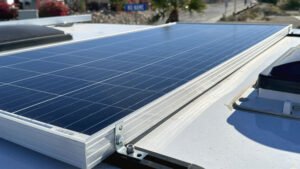
Well, considering we have now gone as many as 45 days without hookups – not too recently, mind you – it seems appropriate to provide some tips for making the most of your boondocking days. First, we refer to boondocking here as anytime we’re not hooked into the grid for the night. Ergo, any night spent without hookups is boondocking to us – whether it be out in the boonies or in a WalMart parking lot. Technically though, according to a “Disconnected RVing” article in the Escapees magazine we now get; if your staying in a campground without hookups, that is considered Dry Camping. But this post isn’t about linguistics. It’s about seeing how long you can go without hookups, comfortably. And comfort is the key here. It takes a certain level of which to truly enjoy long term boondocking. Which we do, so keep that in mind as we share our methods, or madness depending on how you look at it … Go Solar – A basic system including solar panel, charge controller and inverter will help keep your batteries charged and provide AC power when not plugged in. As with anything of course, the more you spend the more you get. A large bank of 6v batteries and multiple solar panels may enable you to go longer before re-charging, if you have to at all. But this can quickly drain the pocketbook. We get by with one 120w solar panel, a 2400w inverter and the two 12v RV batteries that came with our trailer. Stay Charged Up – To keep your batteries healthy, never let them drain completely. Many recommend charging batteries if they fall below 12 volts. Our inverter will automatically shut off if voltage drops below 11.7 volts. Get yourself an accurate voltmeter and run your generator to charge batteries as often as necessary.
Use the Sun – Solar power is best suited for “float” charging which is basically keeping batteries topped off when they are about 90% charged. So take breaks during the day to let the sun do its work. A generator is better suited for “absorbtion” when battery power is further depleted. The best time to fully charge batteries with your generator is in the morning when they are at rest. Consider Your Position – You know your rig. If you have solar panels, park so they get maximum exposure to the sun throughout the day. For us, it is best to park facing the northwest. That way our satellite dish will not cast a shadow on our solar panel. Go in the Woods – Use vault toilets whenever available, or a tree if not, to conserve water from flushing. Bundle up – In cold weather, put on a sweater or grab another blanket before considering wasting battery power and propane by running the furnace. Strip Down – If it’s hot, put on your shorts or consider moving on to where it’s not. Your air conditioner will quickly drain your batteries, if your solar power system is capable of running it. Stock Up – Before heading out to the Boonies, always ensure your fresh water tanks are full and you have plenty of gas for your generator and propane in your tanks. It helps to have empty waste water tanks too! Stock Up Some More – Carry extra fresh water with you when planning extended stays without hookups. We use three collapsible 5 gallon water jugs and various other containers for topping off our tank. Conserve – Sounds simple, but it is the most important thing to consider when boondocking. And it relates to both power and water. Use headlamps or battery powered lanterns rather than your house lights. Never leave lights on when not needed. We go so far as to remove the LP leak detector fuse so its LED light doesn’t glow.
Conserve Even More – When taking a shower, run the water into a tea kettle or other container while it heats up so none is wasted. Take short bird baths with as little water as possible, or consider skipping daily showers. Use body wipes to stay feeling fresh. Play The Shower Game – Try to see how little water you can actually use. Wet down within a few seconds. Soap up, then rinse off quickly. Shower immediately after one another so you don’t have to wait for the water from the faucet to warm up again. Fill Your Black Tank – Grey water tanks often fill up quicker than your black water. So wash dishes using a tub and pour the dishwater down the toilet. Turn the water pump off when doing this so the toilet will not flush. Make One Pot Meals – Plan meals you can make using one pan to reduce dish washing. We find that grilling uses the least amount of dishes and is much more enjoyable anyway. Wipe Before Cleaning – Wipe out all dirty pans and dishes with a paper towel before washing to reduce the amount of water required. Work Offline – Our biggest electrical draw is our network. With two laptops, a wireless router, MotoSat dish controller, HughesNet modem and network storage, we can drain our batteries within a few hours on a busy cloudy day. So, we do whatever work we can offline before booting up the network. Leaving the network drive unplugged helps, and once we are locked onto our satellite we also turn off the dish controller since there is no need for that again until we have to put the dish down.
If you have any helpful off-grid RVing, “dry-camping” or boondocking tips of your own please share them by leaving a comment. And let us know how long you have gone without hookups or if you just abhor the idea. |


Here’s another one of those “luxury” purchase decisions that make one contemplate that old want vs. need dilemma.


Entries (RSS)