Posts Tagged “internet”

Today we’re dusting off a few of our best and most well-received blog posts from the last four years in honor of our recent nomination to Tripbase’s “My 7 Links” blog project.

The aim is to unite bloggers of all different topics to share lessons learned and create a bank of long but not forgotten blog posts that deserve to see the light of day again.

Here we go!

Our 7 Links

Most Popular Post: On A Budget, Build Your Own RV

Surprisingly, more than 150,000 readers have seen this brief, 25-word description of resources for building your own van conversion, camper, trailer, or boat, from the long defunct Simple Living Network. The cool homemade fifth wheel video we added must have helped!

Most Helpful Post: Troubleshooting the Norcold N821 RV Refrigerator

The ongoing discussion in the comments we continue to get on Jim’s post about troubleshooting our Norcold RV Refrigerator has proven more helpful than the post itself.

A Post Whose Success Surprised Me: Ringing Up the Dead in Forest Park Cemetery, Brunswick NY

Who would’ve thought our rather uneventful trip to Forest Park Cemetery would stir up so many eerie reports from one of the most haunted cemeteries in America.

Most Beautiful Post: RIP Spoonie Gee

Helpless is the only way to describe the feeling of learning about the death of a loved one when you’re on the road. Oh Spoonie. We wish we could have saved you from yourself.

Most Controversial Post: Stealth Greywater Dumping: Do You or Don’t You?

Only an RVer can talk about sewer dumps and stinky holding tanks over breakfast. Learn who does and who won’t let go of skanky water out in the hinterlands, one of the dirty little secrets of RVers.

 A Post that didn’t get the Attention it Deserved: How to Color Your Hair as a Fulltime RVer

Keeping my hair color in shape while living in a tiny space has been one of my biggest challenges since fulltime RVing. Am I the only one who struggles with this?

The Post that I am Most Proud of: Mad Max Meets Good Sam at the Slabs

Few places evoke such visceral reactions from RVers as Slab City USA. This objective article addresses the surprising, the beautiful and the entertaining aspects of the Last Free Place for weary travelers.

7 Links: Who’s Next?

And now, in the spirit of the My 7 links project, we are nominating the following bloggers to share their wisdom by publishing their 7 links on their blogs:

Watch for the best posts being shared everyday on the Tripbase Facebook  page and Twitter feed at #My7Links.

Comments 5 Comments »

Here’s that informative post I promised before i got distracted by those great steaks and cocktails at the AA. I hope at least, that anyone who publishes an RV blog – or any website for that matter – will find this information, well… informative!

Badlands Warning SignA while back, fellow Nü RVers those tech nomads informed us that a certain website was repurposing blog posts, not only from this site, but theirs and those of a number of other RVers.

Sure enough, a simple search revealed that entire posts of ours, including photos, were being republished in their entirely without our permission. Furthermore, we discovered that the site in question was a paid membership site, so it was using our content for profit!

The infringing website’s owner argued that because we make our posts available via rss feed, that the content was free to use as he wished. A bogus claim from someone who hadn’t done his homework, but a slightly grey area nonetheless.

TIP: To search a specific website for something you wrote, use Google and enter a distinct phrase followed by “site:” and the domain, like this…

“freaky vegan cooking” site:liveworkdream.com

Replace domain.com and the phrase or keywords to meet your needs.

While we were able to remove all existing and future content of ours from the website in question with one request, it got me thinking. I decided to do my own homework regarding the rights of web publishers, and gladly share what I found out here.

Ownership Rights of Web Content Publishers

According to the The Berne Copyright Convention, everything on the internet is considered copyrighted the moment it is written. Under the Berne Convention, copyright is automatic upon publication and does not require formal registration. When the United States joined the Convention in 1988, however, statutory damages and attorney’s fees continued to be available available only for registered works.

According to the World Intellectual Property Organization Copyright Treaty of 1996, “compilations of data or other material (databases), in any form, which by reason of the selection or arrangement of their contents constitute intellectual creations.” All blog content is stored in a database and is therefore an intellectual creation.

The Digital Millennium Copyright Act of 1998 (title 17, U. S. Code) states that “Copyright protection subsists, in accordance with this title, in original works of authorship fixed in any tangible medium of expression, now known or later developed, from which they can be perceived, reproduced, or otherwise communicated, either directly or with the aid of a machine or device.”

Finally, by republishing our copyrighted content on a for-profit website I confirmed that the infringing site was  in violation of the federal copyright fair use doctrine, as described in sections 107 through 118 of the copyright law (title 17, U. S. Code)

Please note that I am by no means a lawyer, not even close, in any way. So I consulted one. I visited the free legal advice website LawGuru.com and asked:

What law can be cited when notifying someone who has republished original website content without permission, when they insist syndicated content (rss) is in the public domain?

My research proved me correct. Here is the answer I received:

You can cite 17 USC 106 which defines your exclusive rights, including a right of attribution, and 17 USC 501-506 which define your remedies. 505 authorizes recovery of attorneys fees and expenses and 506 may make it a criminal offense, particularly when done via the web.

However, you need to know that for the Court to have jurisdiction to enforce a copyright in the US, you must first apply to register it. It is a simple process for a copyright attorney to do that online. You should use an attorney, so that the attorney can simultaneously write a CDL (cease and desist letter) to this apparent infringer. A letter from you is not likely to have the same effect and not likely to be worded for optimum impact. In fact, most do-it-yourself non-lawyer CDLs are a disaster and some even create grounds for countersuit.

So, if you want to ensure your legal rights to anything you publish, see a copyright attorney, consider assigning a creative commons license, or register your own copyright.

How to Re-Publish Blog Posts From RSS Feed

There are numerous blog aggregators on the interwebs that legally republish copyrighted content. They do this by only publishing an excerpt, assigning attribution, and including a link to the original source. But there may be times when one might wish to republish content from another source in its entirety, when it is appropriate to do so. Like when said person owns the copyright to the original content, or has explicit written permission to do so.

WPMU DEV - The WordPress ExpertsI’ve been considering doing just that with a new Tripawds Blog that will republish posts from our five featured blogs, giving readers one location to find all the best news, gear, gifts and nutrition advice for three legged dogs in one convenient site. Just how would I go about doing this?

To republish our own content and consolidate posts from multiple different blogs in one site, I plan to use the Autoblog plugin from WPMU Dev. Should you choose to do the same, of course, we know you’ll be certain you have the rights to do so.

Recommended Reading

Infringement Nation: Copyright 2.0 and You

Patents Copyrights and Trademarks for Dummies

The Pocket Idiot’s Guide to Copyrights

Every Writer’s Guide to Copyright and Publishing Law: Third Edition

Law of the Web: A Field Guide to Internet Publishing

Comments 10 Comments »

My dad once told me a similar joke where an immigrant gave up on learning the English language after reading that headline. But yet again, I digress.

Though I have said it before, whenever I go AWOL around here you can rest assured it has something to do with three legged dogs. This time was a big deal.

I recently completed the long overdue Tripawds site makeover with a complete overhaul of the site’s theme and active plugin structure. Anyone interested in the easiest way to make random header images or how to integrate multi-site stats into a site-wide header might be interested in the bit I wrote about how to customize the WPMU-Nelo custom homepage CMS WordPress theme.

Suffice it to say, however, that this undertaking was a crash course in php and css. And so far, it has paid off. Speaking figuratively, not literally. My prime directive for overhauling the Tripawds site was to improve performance in the discussion forums.

We started Tripawds using Mandigo, the same theme behind this blog and the RVblogz community. It has served us well. Mandigo is massively configurable, with lots of java and many files. Over the past few years, Jerry’s blog infrastructure had become bloated.

Too many hacks, scripts and widgets were bogging down the site.
WordPress, Multisite and BuddyPress Plugins, Themes and Support - WPMU DEV

So how did I do it?

One word: WPMUdev.

Seriously, there’s no way I alone could make the Tripawds Blogs community what it has become without my WPMUdev premium subscription for the best WordPress themes plugins and support. That’s how during the recent makeover I easily implemented robust new features like a global site search and searchable directories for blogs and members.

It’s also where I got the lean and mean WPMU-Nelo. Hacking this slick WordPress theme to bits was relatively easy, even for me due to it’s code simplicity and parent/child theme structure.

Did someone say digress? We’re in Quartzite now with the Nü Crew, and I haven’t even written about Walla Walla. As much as I hate reading blogs that bemoan infrequent updates, we gots some catchin’ up to do!

Comments 1 Comment »

Huh? Bear with me.

Unexploded Ordnance at Slab City LibraryWe feel right at home back in our same spot here on the Slabs after our windy Borrego holiday. The sun… the Range… the bombs.

Bright blasts on the horizon were big last night, and close enough to thump the ground. But the blast took about nine and a half seconds to be heard. Quick, do the math.

Sound travels at the approximate speed of 1,100 feet per second. With blasts seen about 9.5 seconds before being heard that puts bombs just 10,450 feet away. Divide that by by 5,280 feet in a mile and you have very big bombs exploding 1.9791667 miles away. And what on earth does this have to do with Google, you ask?

In doing a simple search for the speed of sound and how many feet in a mile, I discovered that Google is indeed going to take over the world!

Before long, every web page visited will be tracked, logged, analyzed, stored, and marketed to accordingly in Googledom. With the search engine’s recent makeover, users have new powerful search and sorting options. They also have a responsibility to their own users for not passing encoded googlinks capable of tracking who knows what viewer history information. Which is exactly what you will do when simply right-clicking to copy an URL now from Google search result links. Check it out for yourself.

What do you think all this means?

http://www.google.com/url?sa=t&source=web&oi=sw_smartlist_search_result_link&ct=result&cd=1&ved=0CBoQswYwAA&url=http%3A%2F%2Ftripawds.com%2F&ei=M26dS7T8FMH98Aa_842UDg&usg=AFQjCNHgne-o4U_dm4KmN-ADLp7kIoPMuA

So, that big bomb Google has dropped? No more absolute url copying for direct links to search results. Right click to copy a link and you now get a Googlurl encoded with plenty of tracking voodoo. What’s more disturbing yet? It was dropped by a stealth bomber…

It means this:

http://www.tripawds.com

Roll over any Google search result link and the browser status bar shows the actual url. At least Firefox does, on my Mac. And that’s pretty sneaky if you ask me. Not until a link is copied will the truth be told.

If you prefer to defy assimilation, here’s what to do: beneath Google search links a partial URL for the result is included in small green type, with no hyper link. Select that and copy if you don’t care to be part of the machine.

Military Maneuvers on the Slabs near Niland, CA

Apparently this has something to do with outbound SERPs. More like outright usurpers if you ask me. Check this Razzed blog for further Google outbound link tracking analysis. And try to pay attention where you’re sending people with your copied links. I sure will now.

Comments 8 Comments »

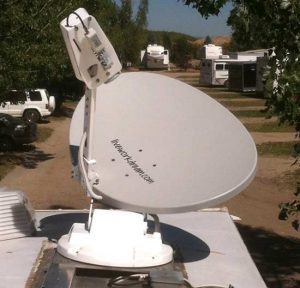
So the new elevation motor for our F2 satellite dish finally arrived. Many thanks to Solar Mike for letting us use his address. But of course the package did not include any of the insulated Scotch Locks I was promised it would. Big surprise, it was hard enough getting a tracking number from MotoSat.

MotoSat F2 Motor Repair in Slab City

“If you’re near a Lowe’s or home Depot…” the MotoSat tech started to tell me where I could get some Scotch Locks. I cut him off with a laugh, “Yeah, right!” A couple standard insulated wire connectors I had would have to do the trick.

After a day of brief flash floods, and too many days of sharing our MiFi wireless internet connection, I was able to quickly and easily replace the motor set – thus completing yet another repair on our dish. All seemed well as the dish successfully completed its calibration. Then upon search, it returned a motor stall error, azimuth this time. Big Surprise.

Sending the dish up again resulted in success. A fluke? Perhaps. But something didn’t seem right. When the dish went down, it’s azimuth was way off. While the D3 controller reported 0º azimuth, the dish was clearly out of alignment. After a couple more tests we could could not reproduce the error. So we are back online with good ol’ satellite 91 West – telling ourselves again that if it ain’t broke, don’t fix it.

Deep down we are hoping we don’t have another motor going bad, however, because MotoSat informed us of an interesting clause in their warranty agreement. All replacement parts are only covered under warranty from the original system purchase date. So the replacement motors – yes, motors plural – we have installed, are only covered until our original warranty is up. A date which is quickly approaching. As I said, big surprise.

Comments 8 Comments »

Here’s a long overdue shout out to the fine folks at EagleSat. This small family-owned business in Longmont, CO serviced our MotoSat satellite internet system the last time we had problems. Which was apparently not the last time.

EagleSat Repairs MotoSat F2 Satellite Dish on Artic Fox Fifth WheelAt the time we had trouble locking on to our Satellite, with frequent motor stall errors. My usual multiple calls to MotoSat for support, and their routine responses about upgrading firmware, resulted in determination that a shop repair was necessary.

We weren’t about to return to Salt Lake City again, and pickings were slim for mobile internet experts in Wellington, CO. Our choices were an upholstery shop that sold MotoSat systems in nearby Fort Collins, or driving a couple hours to EagleSat. We opted for the latter and were glad we did.

One phone call to Frank, and we had an appointment scheduled and parts on the way. The next week we spent a day with he and his son Adam working on our rig, and we were home before dark. They cleaned up our entire system, replaced all the motors, and yes, even upgraded the D3 firmware.

So here we sit now, waiting for another elevation motor set to arrive. As soon as we set up here on the slabs, the dish wouldn’t budge. After troubleshooting all I could, the first person I called was Adam. He was polite, generous with his time, and helped me determine that both our elevation motor was shot, and I could do the repair myself. All I had to do was call MotoSat for the part. Oh that, and find an address for shipping.

Slab City Community SignSolar Mike was kind enough to let us ship our parts to him. I’d be on the roof reassembling everything right now if MotoSat hadn’t left a message saying the part is on back order and it may ship out next week. At least they were kind enough to call and let me know! In fact, Matt was the nicest tech I’ve dealt with at MotoSat in a long time. Maybe he hasn’t been there long enough to develop the characteristic arrogance and impatience I have encountered in the past.

But there I go digressing once again. It’s just a good thing we now have our MiFi for internet service redundancy! I could think of worse places than Slab City, USA to be waiting on parts. Ones that cost money for instance. But if I run into any challenges putting our F2 mount back together, I know who I’ll be calling …

EagleSat is a satellite communications company specializing in remote site connectivity and network interoperability. They offer premium mobile satellite solutions for commercial use and the recreational consumer (Motor Coaches and RV’s). EagleSat offers a full-line of mobile satellite systems for Internet access (voice and data) and/or television reception. And they know their stuff – there is a reason they service MotoSat systems, but not sell them!

Comments 11 Comments »

BLM Boondocking HWY 50 Salida, COMotoSAT’s answer for any connectivity issues with our mobile satellite internet system always seems to be, “Upgrade your firmware.”

So, I always make it a point to make sure ours is current before calling for support. I also turn to others for help. Like Sean who had this advice regarding the best positioning for quick access…

“Try increasing the size of the search window, especially in azimuth. The internal compass, like all compasses, is prone to a lot of error, and sometimes even the declination table is off. So it is possible that the bird is sitting there a few degrees outside the window, and the mount will search the whole window first, before expanding to a broader search.

Calibrating the compass also helps – the real way, which involves turning the rig around an exact 180° – especially if it has not been done in a while.

Lastly, be aware that if you park such that the bird is nearly directly above the way the dish points when stowed (usually directly aft), then the dish will search all possible elevations at a few degrees azimuth before spinning all the way around to try all the elevations at ~360° azimuth. This can add significant time to the search. We try to avoid parking in this orientation, and, if we want to stop someplace just to put the dish up, I even try to park such that the bird will be found in the first ~90° of azimuth – saves time and wear on the drive motor.”

Well, it turns out that compass calibration isn’t even possible with our dish. One expert installer informed us that only older systems have a compass.

But we recently tested Sean’s parking position theory when it took forever for our system to identify any signal. We had inadvertently parked with 91W directly to the rear of our rig. Sure enough, when we relocated and parked pointing a little more West, we were online within a couple minutes. This position works best for us anyway, especially when boondocking. Doing so prevents the dish’s large shadow from covering our solar panel throughout the day.

Comments 6 Comments »

During our stay at Landa Park in New Braunfels earlier this year, I thought we discovered the headquarters of HughesNet, our mobile satellite internet service provider. But it was just some company with the same name that I have decided to call the team at Hughes: FAPCo

FAP (Fair Access Policy) n: A download threshold assigned by Hughes to each HughesNet service plan that limits the amount of data that may be downloaded during a typical day. A small percentage of subscribers who exceed this limit will experience a temporary reduction of speed.

What is FAPCo New Braunfels TexasHa! Temporary? Reduction? Like I said, Ha! You definitely know when you’ve been FAP’d, because your connection will crawl to a virtual halt. Without warning. And it can stay that way for up to 24 hours.

Our service plan comes with a daily download threshold of 375 MB. Every once in a while, if we don’t pay attention to how much time we spend online – or what we download – in a given day, we may get FAP’d. But during our stay at Landa it happened a number of times. Enough to think someone was piggybacking our network. But we’ve learned to lock it down tight, and one look around made us really question if any of our neighbors were capable of hacking us. So we sought a better method for monitoring our daily HughesNet account usage. Here’s what we discovered …

Our fellow full-time geek friend Sean, of Our Odyssey told us about the HughesNet FAP Monitor. This Windows-only utility displays an icon indicating your current HughesNet usage status and warns of any imminent Fair Access Policy violation. We’re no dummies, but had a terrible time getting this to work on Rene’s machine, but with Sean’s perseverance we got it configured and working. For a while. One day it just stopped working. And we gave up trying to fix it after discovering various discussions about HNFP not working.

The one thing the HughesNet FAP Monitor was good at, while it worked, was making René obsessed about our current FAP status. So I quit trying to make it work after finding a better solution. One that works on my Mac (or any machine) and isn’t always flashing in my face.

Grease Monkey Firefox Add-on Fap Monitor ScriptThe Greasemokey Firefox Add-On allows you to customize the way a webpage displays using small bits of JavaScript. And the Hughes Usage Calculator script will customize the display of your Hughesnet account information page.

This method lets me check our threshold status, when I want to. The script adds a “Remaining (MB)” column to our HughesNet usage page with convenient color-coding to indicate when we should step away from the computers for a while. It was simple to set up, here’s how …

  1. Use Firefox
  2. Install Greasemonkey
  3. Install User Script
  4. Submit Your HughesNet Site ID
  5. Bookmark Your HughesNet Usage Page

This isn’t to say we’ll never get FAP’d again, but at least we can easily monitor our usage now without getting all obsessive about it.

Novatel Wireless MiFi 2200 Intelligent Mobile Hotspot - BlackSince drafting this post we have discovered an even better way to avoid the FAP. We have gone redundant, and now also have a Verizon Wireless MiFi 2200 Intelligent Mobile Hotspot. This allows us to spread our bandwidth usage over two different accounts. It also gives us two methods to connect, in case there is something blocking our satellite, or we have n cell phone coverage. More about this later…

Comments 13 Comments »

Now that we’re getting a new iPod, maybe I can convince René we need an iPhone! Just check out this amazing new iPhone app that lets you easily find any satellite…

This next generation satellite finder is straight out of Star Trek! What will they think of next? Simply point your iPhone anywhere towards the sky and all the satellites will appear on the live video screen. Kinda surreal and freaky, if you ask me.

The best part? Again, if you ask me … Now you can easily tell which trees will block which satellite. That’s a good enough reason for me to buy a new iPhone! Sure, like that’s gonna happen.

This new DishPointer Augmented Reality application uses the accelerometer and the compass of the new iPhone 3GS. The compass apparently has a bit of a lag, so when spinning the phone right or left the satellite belt is shifted with a slight delay but up and down works in real time.

Of course, I would have first hand experience with this if I had an iPhone. I only know because Alan let us know about this and other cool satellite iPhone apps he’s been working on over at dishpointer.com. My first post about his DishPointer satellite alignment widget has been one of our most popular posts here, so I just had to share this new cool tool!

Comments 2 Comments »

LinkWithin Related Stories Widget for Blogs


Banner